
How to Search Cases by Name
A name alone won't tell you which Montgomery County court has the case. Superior Court holds felonies, divorces, title and equity matters, and major civil work. Magistrate Court keeps its own claims. It also holds dispossessory, garnishment, warrant, bond, and preliminary-hearing files. Probate Court handles probate and some traffic records. Municipal courts keep city traffic and ordinance dockets. So start with whatever court is printed on your summons, filing, citation, or order.
- Identify the court class and confirm Montgomery County.
- For Superior Court, open Georgia Courts E-Access and follow the Montgomery entry to PeachCourt.
- Register or sign in, then choose Search and Cases.
- Select Montgomery County and Superior Court where those controls appear.
- Use the permitted party-name path if the case number is unavailable, then compare court and case type carefully.
- Open the likely match and verify its court, number, date, and parties.
Montgomery offers no complete anonymous name-search form for the public. PeachCourt's diagnostic search help lists name, partial name, email, partial email, and bar-number fields for its user-search tools, though those fields should not be promised as the exact live case-search screen. A login gate stands in front of the actual docket search.
| Field Label | Type | Required | Notes |
|---|---|---|---|
| Text | Yes | Account email used to sign in | |
| Password | Password | Yes | Forgot Password link is available |
| Login | Button | Action | Opens an account session |
| Register | Link | No | Opens free account registration |
Montgomery Case Lookup Through E-Access
The Georgia Courts E-Access directory routes you to providers. It houses no single statewide public case database. Its Montgomery Superior entry points to PeachCourt. Georgia's e-file directory also marks PeachCourt mandatory for Montgomery Superior. Neither listing covers Probate, Magistrate, Juvenile, or every municipal docket under the same account.
PeachCourt's documented path is Search, Cases, county, court, exact case number, then Search again. A separate Search, Filings path takes only an exact Peach filing number. The difference matters. An e-filing identifier is not necessarily the local case number. Copy the label straight from your filed paper. Don't guess which field a number belongs in.
How to Search by Case Number
No official public page displays Montgomery County's case-number pattern. PeachCourt tells users to enter the exact number the chosen court uses. The safe example is exact number from court paper. Keep the same letters, punctuation, and spacing when the form allows them. One help-page URL shows 19-G-198, but the source labels that a Cobb State Court example. It is not a Montgomery format.
Pick your county and court before typing the number. Fewer false matches follow. If the number is unreadable or missing, ask the responsible clerk to confirm it. Never convert a citation number, a Peach filing number, or another Georgia court's number into a guessed Montgomery case number.
Montgomery Docket Fields Behind Login
A PeachCourt account gate limits what anyone can confirm before signing in. The PeachCourt access page asks for an email and password and offers registration and password recovery. That first sign-in step is what the court's page documents.
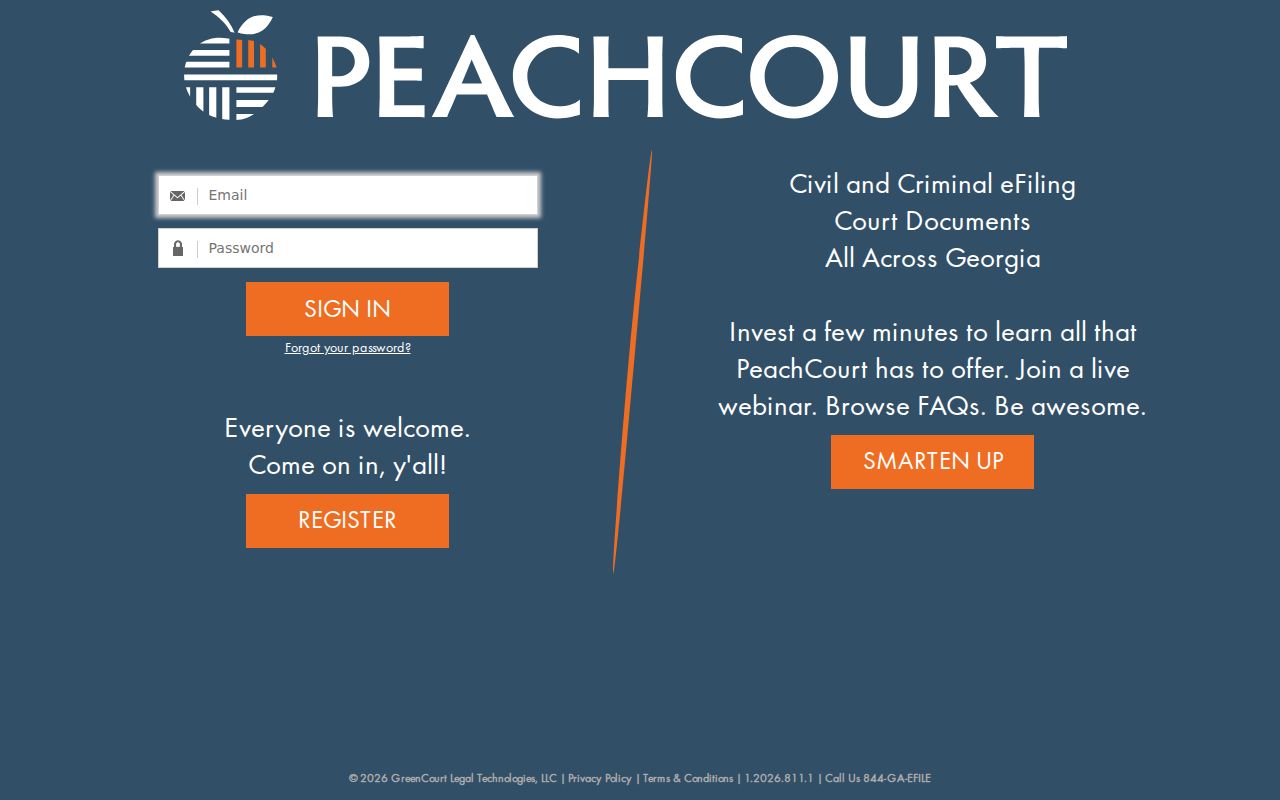
The official page supports the account requirement, not any claim that every Montgomery docket field is open to the public. Case details and filed images stay behind account access and court rules. The PeachCourt registration page lays out the account fields in its form.
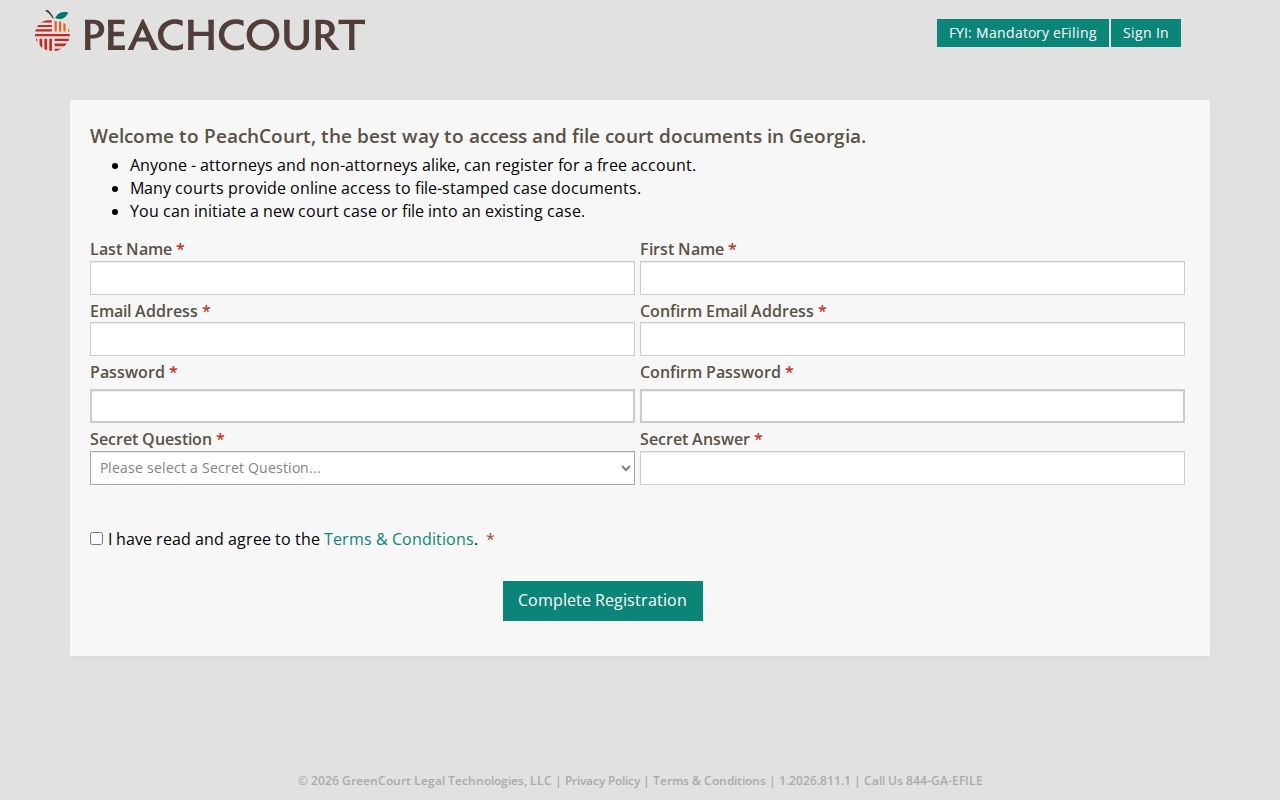
Registration asks for a name, email confirmation, password confirmation, a secret question and answer, acceptance of terms, and a CAPTCHA. The form itself says the account is free. Document images, though, may carry separate charges.
What a Case Search Shows
A Montgomery County lookup may return a bare index or full docket detail. Confirm each field after you sign in rather than assuming the screen will display it. Treat any field list as something to verify. The docket can organize case events. Filed documents remain a separate, paid layer.
| Case Number | The exact local identifier to compare with court papers. |
|---|---|
| Style or Parties | The case caption, if public and displayed. |
| Case Type | The court's classification, which should fit that court's jurisdiction. |
| Filed Date | The filing date, if exposed after account access. |
| Status | A current status or disposition label, whose local vocabulary must be checked. |
| Settings | Date, time, judge, room, and setting type when available. |
| Documents | File-stamped images available to eligible account holders, subject to exclusions and charges. |
PeachCourt states that file-stamped documents generally cost $0.50 per page plus a small convenience fee. Sealed items, adoption material, and proposed unexecuted orders are excluded. No financial ledger appears on the screen. So do not treat a search result as complete. It may not show costs, bond, restitution, or judgment amounts.
Montgomery Cases Versus Filing Searches
PeachCourt keeps Search, Cases apart from Search, Filings. A case search targets the court matter itself. It uses the county, court, and local case number. A filing search uses the exact Peach number tied to one e-file transaction. The two routes can lead to related information, but their identifiers do different jobs.
| Cases Search | Filings Search |
|---|---|
| Select county and court | Use the exact Peach number |
| Locate the court case or Case Docket | Trace an e-filing transaction |
| Best when the local case number is known | Best when the filing receipt supplies the Peach number |
When you hold only one identifier, use the field labeled for it. If the portal rejects the value, go back to the paper or ask the clerk which number it carries.
County vs Statewide Case Search
Georgia offers no single public database holding every Montgomery County court. E-Access routes each listed court to a provider. For Montgomery Superior that provider is PeachCourt. Lower-court records stay with Probate, Magistrate, Juvenile, or the issuing municipal court. Another route appears only if an official directory or local page supplies one.
| Georgia E-Access Directory | Montgomery Court Channel |
|---|---|
| Identifies a provider for a listed court | Holds or supplies access to the local record |
| Routes Montgomery Superior to PeachCourt | Superior uses PeachCourt and the clerk |
| Is not a unified public search database | Probate, Magistrate, Juvenile, and city files use separate custodians |
This court-by-court design makes the heading on your paper the key search field. A multi-court name query can miss the right file whenever the wrong class of court is chosen.
Montgomery Case Lookup Starts With Court
Match the court before you match the county. A felony or a large civil suit sits in Superior Court. An estate goes to Probate Court. A modest civil claim lands in Magistrate Court. City tickets stay with the municipal court that wrote the citation. The same name can live in several of these files at once.
Three clues settle it. One is the caption on the newest filing. Another is the agency that issued the papers, and the third is the type of dispute. Unsure? Call the clerk before you create an account or pay for a document. That quick check keeps you from reading an empty PeachCourt screen as the final word. It should never stand in for every Montgomery County court docket.
When Montgomery Cases Are Missing
Start with the basics. Confirm the county, the court, and the exact case number on the Montgomery County case lookup you attempted. For a Superior matter, use PeachCourt's missing-case form. It asks for the account email and accepts either county, court, and case-number rows or a pasted Case Docket URL, with comment space and controls to add or drop rows.
Still stuck? Call the Clerk of Superior Court at 912-583-4401, visit the courthouse counter, or use a public terminal for inspection. A written request can go to the confirmed custodian of the record. Check mailing and delivery details with the office before you send personal data or payment. Probate matters go to Probate Court at 912-583-2681. Magistrate Court takes calls at 912-583-2170. A city citation belongs with the municipal court that issued it.
No result is not a finding. A case may belong to another court, use a different number, predate the online index, or be restricted from public display.
Montgomery Case Lookup Access Routes
An online docket search is only one door into the courthouse. The Clerk of Superior Court keeps the Superior docket. The clerk helps by phone or at the counter. PeachCourt notes that clerks may provide a free public terminal. When searching alone cannot answer the question, a written request stands as the fallback. Georgia open-records guidance directs requests to the custodian. Court files also answer to court rules and sealing orders.
Probate, Magistrate, and municipal offices each run their own files. Law limits access to juvenile records. For a lower-court case lookup, bring the right details. Have the full name, the court, an approximate date, and the case or citation number. Add the specific record you want. Say whether you need inspection, a plain copy, or a certified copy. A downloaded image does not certify itself.
Restricted Cases and Access Rules
Uniform Superior Court Rule 21 opens court records to the public. A law or court order can limit access. The rule also sets out a sealing process, and sensitive identifiers face redaction requirements. So juvenile files, sealed cases, adoption records, and protected personal data may not surface. They sit outside an ordinary public Montgomery County case lookup.
A blank result proves nothing. It does not show that a restricted case never existed, and it grants no access. Ask the responsible clerk about the public portion of the file. Ask also about the procedure for requesting restricted material. Knowing a name or number does not let the clerk ignore a sealing order.
Montgomery Public Terminal and Counter
A trip to the courthouse brings two kinds of help. A public terminal gives you searchable Superior Court information without any personal device, and the clerk's counter can pinpoint the right file and walk you through inspection or copies. PeachCourt's mandatory e-filing materials say clerks may provide a free public terminal. Still, confirm availability with the Montgomery clerk before your visit.
Come prepared with the court name, case number, full party name, and an approximate date. Ask which details are public before ordering copies. The terminal is no workaround for sealed or protected records, and counter staff cannot offer legal advice on what a docket entry means.
Montgomery Search Result Versus Record
Treat an online result as a research aid. A certified copy is different, because the clerk holding the original authenticates it. PeachCourt's docket can locate a Superior case, track public entries, and spot a setting. Yet the screen is not a certified record, and it may lag on documents or recent changes. For formal use, ask the clerk which copy and certification steps apply.
Montgomery copy fees, mail procedures, and processing times are not posted. Confirm them before sending funds. The wider Montgomery County court record search covers the file behind the docket once that page is live. The rule of thumb holds. Locate online, verify with the custodian, and request the proper copy from the court.